

 Records Management Software
Stop digging through folders.
Just search.
Archive is records management software that organizes and stores your office’s documents digitally for easy search and retrieval.
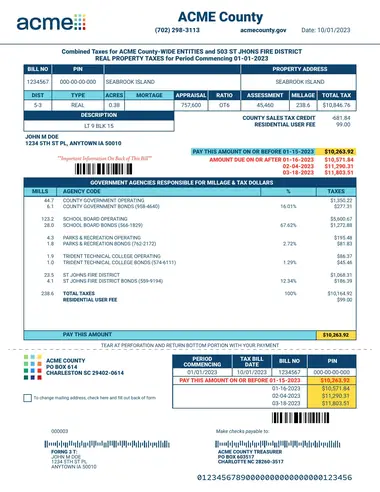
For tax commissioners, clerks, and any office with years of records to search. Set up and supported by Racami.
Three ways offices use Archive.
Tax offices, clerks, permitting, utilities: if your department keeps PDFs, Archive makes them easy to find. Hover over a card to see how it works.
Instant Staff Search
Find any document in one search.
Any staff member can pull up the exact document they need, without digging through folders.
Online Bill Lookup
Present bills directly on your website. Citizens look up their own.
A citizen looking for this year’s tax bill finds it on your site and opens it there, without calling your office.
Click-to-View Emails
Email citizens a secure link. They open the document online.
Send a link instead of a copy. One click, and the citizen is looking at their own document.
Instant staff search. No more digging through folders.
A shared drive only searches file names, so finding one bill means knowing where someone saved it. With Archive, anyone on staff finds the exact document in one search.


See the simplicity in action.
Book a demoOne set of records, tailored for each person’s goals.
Send us your PDFs. We do the rest.
Your staff won’t have to configure software. Racami sets up Archive with your team, hosts it, and stays on to support you.
One file, every document

Security you can trust. Support you can rely on.
Public records deserve careful handling. Archive keeps them hosted, secured and under your control, 24/7.
Security certifications. SOC 2 Type II compliant.

Frequently asked
questions.
Do we need to replace our current system?
No. Archive works alongside your tax system and the other systems you use today. It starts from the PDFs those systems already produce and makes them easy to find.
Why not just use a shared drive or Dropbox?
A shared drive stores files, but its search mostly looks at file names. Archive reads what’s inside each document, so staff can search by name, account or parcel. It also gives your website and citizens their own views, and Racami sets it all up for you.
Which departments can use Archive?
Any office that keeps documents as PDFs: tax commissioners, clerks, courts, permitting, utilities and more. If you produce or receive PDFs, Archive can make them searchable.
What do we need to send you?
Your PDFs. If you also have a file that marks the start and end page of each document, send it too. If not, we build templates that find each document for you.
Do we have to split our PDFs into one file per bill?
No. You can store a whole billing run as one large PDF. When someone searches, Archive finds the bill inside it and opens it as its own PDF. Keeping one large file also takes less storage than thousands of small ones.
Can we control what each staff member sees?
Yes. We set up roles with you, so each person sees the document types and fields they need. Some roles may just need to see data, while some may need to be able to search on the data and also view the PDF. Everything is configurable to meet your team’s needs. We can also load your staff list from a spreadsheet instead of adding people one by one.
How does it connect to our website?
Through our API, which lets your site show documents in guest view, inside your own pages. We’ll work with your web team or vendor on the setup.

See Archive with documents like yours.
By the end of the demo:Fill out the form and our team will contact you to arrange a time.